# PagePartBundle Documentation
## Pageparts
The KunstmaanPagePartBundle forms the basis of our content management framework. A page built using a composition of blocks names pageparts. These pageparts allow you to fully separate the data from the presentation so non-technical webmasters can manage the website. Every page can have it's own list of possible pageparts, and pageparts are easy to create for your specific project to allow for rapid development.
### Configuration
For each page you can configure multiple contexts which pageparts in it. (For example "main", "banners", "right column", "footer").
#### Configuration in PHP
```PHP
class HomePage extends AbstractPage implements HasPagePartsInterface
{
...
public function getPagePartAdminConfigurations()
{
return array(new HomepageMainPagePartAdminConfigurator());
}
```
```PHP
use Kunstmaan\PagePartBundle\PagePartAdmin\AbstractPagePartAdminConfigurator;
/**
* HomepageMainPagePartAdminConfigurator
*/
class HomepageMainPagePartAdminConfigurator extends AbstractPagePartAdminConfigurator
{
/**
* @var array
*/
private $pagePartTypes;
/**
* @param array $pagePartTypes
*/
public function __construct(array $pagePartTypes = [])
{
$this->pagePartTypes = array_merge(
[
[
'name' => 'Header',
'class'=> 'Kunstmaan\PagePartBundle\Entity\HeaderPagePart'
],
[
'name' => 'Text',
'class'=> 'Kunstmaan\PagePartBundle\Entity\TextPagePart'
],
[
'name' => 'Line',
'class'=> 'Kunstmaan\PagePartBundle\Entity\LinePagePart'
],
[
'name' => 'Image',
'class'=> 'Kunstmaan\MediaPagePartBundle\Entity\ImagePagePart'
]
], $pagePartTypes
);
}
/**
* @return array
*/
public function getPossiblePagePartTypes()
{
return $this->pagePartTypes;
}
/**
* @return string
*/
public function getName()
{
return "Page parts";
}
/**
* @return string
*/
public function getContext()
{
return "main";
}
}
```
#### Configuration in YAML
You can also specify the pagepart configuration in yml:
```PHP
public function getPagePartAdminConfigurations()
{
return array("AcmeBundle:homepage_main", 'homepage_main');
}
```
Those keys in the format `AcmeBundle:name` will be expected in your bundles’ Resources directory:
```YAML
# AcmeBundle/Resources/config/pageparts/homepage_main.yml
name: "Page parts"
context: "main"
types:
- { name: "Header", class: "Kunstmaan\\PagePartBundle\\Entity\\HeaderPagePart" }
- { name: "Text", class: "Kunstmaan\\PagePartBundle\\Entity\\TextPagePart" }
- { name: "Line", class: "Kunstmaan\\PagePartBundle\\Entity\\LinePagePart" }
- { name: "Image", class: "Kunstmaan\\MediaPagePartBundle\\Entity\\ImagePagePart" }
```
Other keys are taken from the configuration:
```YAML
# app/config/config.yml
kunstmaan_page_part:
pageparts:
homepage_main:
name: "Page parts"
context: "main"
types:
- { name: "Header", class: "Kunstmaan\\PagePartBundle\\Entity\\HeaderPagePart" }
- { name: "Text", class: "Kunstmaan\\PagePartBundle\\Entity\\TextPagePart" }
- { name: "Line", class: "Kunstmaan\\PagePartBundle\\Entity\\LinePagePart" }
- { name: "Image", class: "Kunstmaan\\MediaPagePartBundle\\Entity\\ImagePagePart" }
```
### Rendering
Then you can render these pageparts in your template:
```TWIG
{{ render_pageparts(page, 'main') }}
```
Or if you need to manipulate the list with extra html:
```TWIG
{% for pagepart in getpageparts(page, 'main') %}
{% include pagepart.defaultview with {'resource': pagepart} %}
{% endfor %}
```
## PageTemplates
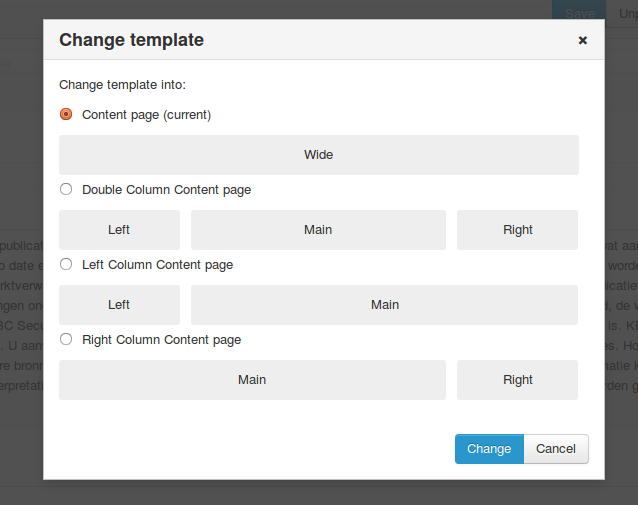
Until now we had specified some pagepart contexts (= pagepart list) and we can include them in our templates at fixed positions. But it's also possible to define multiple templates for these contexts. For example you can have multiple columns, or a singe column and switch between them in the backend. Then there is a 'switch template' button which shows a popup like this:
### Configuration
#### Configuration in PHP
```PHP
class HomePage extends AbstractPage implements HasPagePartsInterface
{
...
public function getPageTemplates()
{
return array(new HomepagePageTemplate(), new HomepageExtendedPageTemplate());
}
```
```PHP
class HomepagePageTemplate extends PageTemplate
{
/**
* constructor
*/
public function __construct()
{
$this->setName("Homepage")
->setRows(array(
new Row(array(new Region("main", 12))),
))
->setTemplate("KunstmaanWebsiteBundle::PageTemplate\ContentPageTemplate");
}
}
class HomepageExtendedPageTemplate extends PageTemplate
{
/**
* constructor
*/
public function __construct()
{
$this->setName("Homepage extended")
->setRows(array(
new Row(array(new Region("main", 9), new Region("banners", 3))),
new Row(array(new Region("bottom", 12)))))
->setTemplate("KunstmaanWebsiteBundle::PageTemplate\ContentPageTemplate");
}
}
```
#### Configuration in YAML
You can also specify the template configuration in yml:
```PHP
class HomePage extends AbstractPage implements HasPagePartsInterface
{
...
public function getPageTemplates()
{
return array("AcmeBundle:homepage", "two_column_homepage");
}
```
Those keys in the format `AcmeBundle:name` will be expected in your bundles’ Resources directory:
```YAML
# AcmeBundle/Resources/config/pagetemplates/homepage.yml
name: "Homepage"
rows:
- regions:
- { name: "main", span: 12 }
template: "AcmeBundle::Pages\ContentPage\pagetemplate.html.twig"
```
Other keys are taken from the configuration:
```YAML
# app/config/config.yml
kunstmaan_page_part:
pagetemplates:
two_column_homepage:
name: "Homepage extended"
rows:
- regions:
- { name: "main", span: 9 }
- { name: "banners", span: 3 }
- regions:
- { name: "bottom", span: 12 }
template: "AcmeBundle::Pages\ContentPage\extended-pagetemplate.html.twig"
```
**PRO-TIP: The name of the region is linked to the context in the pagepart configuration, not the name of the pagepart configuration file.**
### Rendering
This is an example of the extended-pagetemplate.html.twig file:
```TWIG
{{ render_pageparts(page, 'main') }}
{{ render_pageparts(page, 'banners') }}
```
Use this in your page template to render the configured "template"
```TWIG
{{ render_pagetemplate(page) }}
```
## Using sub entities in pageparts
In some cases, pageparts need to contain a set of repetive fields. The best way to achieve this, is by using
sub entities in pageparts. Below you'll find a simple example to illustratate this.
### Example
Let's say you want to display a contact block pagepart on some pages. The pagepart itself has a description
and the contact information of some employees (name + contact email). Assume that the employees will be
different for each pagepart.
#### How the pagepart will look like
We create the pagepart with these fields:
* comment (string)
* contacts (ArrayCollection of ContactInfo objects)
In the admin interface it will look like this:

#### The code
```php
contacts = $contacts;
}
/**
* @return ArrayCollection
*/
public function getContacts()
{
return $this->contacts;
}
/**
* @param ContactInfo $contactInfo
*/
public function addContact(ContactInfo $contactInfo)
{
$contactInfo->setContactPagePart($this);
$this->contacts->add($contactInfo);
}
/**
* @param ContactInfo $contactInfo
*/
public function removeContact(ContactInfo $contactInfo)
{
$this->contacts->removeElement($contactInfo);
}
// ...
```
```php
add('comment', TextType::class);
$builder->add('contacts', CollectionType::class, array(
'type' => new ContactInfoAdminType(),
'allow_add' => true,
'allow_delete' => true,
'by_reference' => false,
'attr' => array(
'nested_form' => true,
'nested_form_min' => 1,
'nested_form_max' => 4,
)
));
}
/**
* Sets the default options for this type.
*
* @param OptionsResolver $resolver The resolver for the options.
*/
public function configureOptions(OptionsResolver $resolver)
{
$resolver->setDefaults(array(
'data_class' => '\Kunstmaan\WebsiteBundle\Entity\PageParts\ContactPagePart',
));
}
/**
* Returns the name of this type.
*
* @return string The name of this type
*/
public function getName()
{
return 'kunstmaan_websitebundle_contactpageparttype';
}
}
```
```php
contactPagePart = $contactPagePart;
}
/**
* @return ContactPagePart
*/
public function getContactPagePart()
{
return $this->contactPagePart;
}
}
```
```php
add('name', TextType::class);
$builder->add('email', TextType::class, array(
'attr' => array('title' => 'Publicly visible on the website'),
));
}
/**
* Sets the default options for this type.
*
* @param OptionsResolver $resolver The resolver for the options.
*/
public function configureOptions(OptionsResolver $resolver)
{
$resolver->setDefaults(array(
'data_class' => '\Kunstmaan\WebsiteBundle\Entity\ContactInfo'
));
}
/**
* Returns the name of this type.
*
* @return string The name of this type
*/
public function getName()
{
return 'kunstmaan_websitebundle_contactinfotype';
}
}
```
#### The available options
There are a few options you can use when you add a collection field in a FormType class:
* __allow_add__
* default Symfony option
* makes it possible to add new object to the collection (show add button)
* optional, default false
* __allow_delete__
* default Symfony option
* makes it possible to delete objects from the collection (show delete buttons)
* optional, default false
* __attr.nested_form__
* custom option
* indication that the field will contain sub forms
* required
* __attr.nested_form_min__
* custom option
* how many objects the collection should minimally contain
* optional, default 0
* __attr.nested_form_max__
* custom option
* how many objects the collection can maximally contain
* optional, default no maximum limit
## Creating PageParts in Your Code
We've provided a ```PagePartCreatorService``` that simplifies the creation of pageparts for your pages.
This works nicely in conjunction with the ```PageCreatorService``` that's present in the NodeBundle.
Another handy service is the ```MediaCreatorService``` that can be found in the MediaBundle.
It's used to easily upload files to the Media part of the backend.
The PagePartCreatorService supports several different syntax styles that can be interchanged with one another.
There are 2 functions available. The first one is the basic function ```addPagePartToPage``` which can only
add a single PagePart to a single page at once. It can however be added in a position of your own choosing.
If the position parameter is left as null it'll just be appended at the end.
It simply expects a Node instance or more conveniently an internal name of a node, a fully instantiated PagePart,
the language for which translation to append it to and finally the position.
The second function is far more useful and can be used to append multiple PageParts for multiple regions
on a single page for a single language. The function's interface is quite flexible. It expects a named array with
the name of the region as the key and an array containing the PageParts as the value.
The pageparts don't have to be instantiated but can be callables instead.
You can also mix & match instantiated PageParts and callables.
No PageParts are saved before each callable has returned an instantiated PagePart.
There are multiple of ways you can provide PagePart information.
* The most obvious one is a PagePart object that you manually instantiated yourself.
* The second way is an anonymous function that in itself instantiates a PagePart.
This is a pretty useful way to do more complex things. You could for example attempt to
upload assets using the ```MediaCreatorService```.
```PHP
function() {
$pp = new HeaderPagePart();
$pp->setTitle("General Conditions");
$pp->setNiv(1);
return $pp;
}
```
* The last one is a convenience-method provided by the PagePartCreatorService.
It basically expects the full class name as a string and a named array with
the keys being the names of the functions to call and the values what will be provided. Perfect for calling setters etc.
```PHP
$ppCreatorService->getCreatorArgumentsForPagePartAndProperties('Kunstmaan\PagePartBundle\Entity\HeaderPagePart',
array('setNiv' => 1, 'setTitle' => 'General Conditions')
)
```
It's also important to note that the singular function ```addPagePartToPage``` does NOT support callables.
Below is an example of what you can do with this with all the styles interchanged.
```PHP
$ppCreatorService = new PagePartCreatorService($this->container->get('doctrine.orm.entity_manager'));
$logo = new Logo();
$logo->setUrl('http://kunstmaan.be');
$pageparts = array(
'banners' => array(function() {
$pp = new Satellite();
$pp->setType('sputnik');
return $pp;
}, $logo
),
'main' => array(
$ppCreatorService->getCreatorArgumentsForPagePartAndProperties('Kunstmaan\PagePartBundle\Entity\HeaderPagePart',
array('setNiv' => 2, 'setTitle' => 'Some Title')
),
$ppCreatorService->getCreatorArgumentsForPagePartAndProperties('Kunstmaan\PagePartBundle\Entity\TextPagePart',
array('setContent' => 'A bunch of interesting content.
')
),
$ppCreatorService->getCreatorArgumentsForPagePartAndProperties('Kunstmaan\PagePartBundle\Entity\LinePagePart'),
function() {
$pp = new InfoButtonPagePart();
$pp->setTitle('Show me more!');
return $pp; // Don't forget to return the PagePart ;)
},
)
);
$ppCreatorService->addPagePartsToPage('homepage', $pageparts, 'en');
```
## PagePart chooser
You can configure the PagePartBundle to use either one of two different ways of adding
pageparts to a page via the admin interface. The first way is simply a select
dropdown with a list of all the available PageParts for that region. A
different more elaborate option can be chosen, it shows a modal with small
screenshots for each possible PagePart. This takes more time to setup for
the developer but will make the ui more user friendly for end users.
### Configuration in yaml
You can add these lines to your app/config/config.yml to enable the elaborate
modal view.
```YAML
kunstmaan_page_part:
extended_pagepart_chooser: true
```
In your PageParts yaml files you can add an extra parameter to each of your
types in the following manner to decide which picture you want to show as a
preview for that PagePart. Any valid input for symfonies asset() function will
do.
```YAML
name: Example
context: Example
types:
- { name: BikesList, class: Kunstmaan\AppBundle\Entity\PageParts\BikesListPagePart } //Will display only pagepart name
- { name: Audio, class: Kunstmaan\AppBundle\Entity\PageParts\AudioPagePart, preview: 'bundles/kunstmaanapp/images/example-image.svg' }
- { name: Button, class: Kunstmaan\AppBundle\Entity\PageParts\ButtonPagePart, preview: 'www.internet.be/imageurl' }
```